Design - Page Identity
October 5, 2026
|
The technote mentioned above explains why OneNote IDs are fragile and how that was measured. This document explains what OneMore does about it. This is planned future work
1. Problem and scope
OneNote regenerates every page, section, and notebook ID when a notebook is closed and reopened, and a moved page receives a new page ID. Created time, title, and content survive. OneMore stores those IDs in its database and later treats them as keys, so references silently stop resolving.
What breaks today
|
Feature |
Stored IDs |
What happens after a reopen |
|
Hashtags |
hashtag_page: pageID, sectionID, notebookID; hashtag_notebook.notebookID; a moreID stamp written into each tagged page |
The scanner matches notebooks by ID, so a reopened notebook looks new. A notebook the scanner does not recognize is scanned automatically only if it has fewer than 100 pages (MaxPagesThreshold); a larger one waits until the user schedules a scan, as the code comment says. In the author's database a reopened 376-page notebook was not re-registered, and reopened smaller ones gained duplicate notebook rows, which is consistent with this (the scanner log was not checked). Phantom deletion matches on section ID and tag purging on page ID, so stale rows accumulate. Identity survives only because the scanner writes a marker into each tagged page. |
|
Favorites |
favorite: notebookID, sectionID, pageID, uri (embeds section and page GUIDs) |
A page favorite navigates by its stored uri, whose page and section GUIDs are persistent, so most page favorites keep working after a reopen (8 of 9 comparable links matched, see the technote). What breaks is everything that depends on a handle ID: section, section-group, and notebook favorites (they store the handle in sectionID and uri), the "is this page already a favorite?" check, which compares IDs and so lets the same page be added again, and any page whose GUID changed because it was re-created or copied. A moved page keeps its GUID but its section-id changes. |
|
Layouts |
layout_window: notebookID, sectionID, pageID, uri |
Restore compares window.PageID with the open windows and navigates by uri. Both fail and the window is silently skipped. |
There is a manual repair path, TargetChecker (the Check button in the manage dialogs). It resolves by ID and then by location path, but it is manual, matches by title path only, and its repairs are never saved: UpdateFavorite and UpdateWindow do not write IDs or the URI, so a repaired reference reverts when the dialog closes.
Goals
- A reference to a page, section, section group, or notebook keeps resolving across close/reopen, page moves (between sections and between notebooks), and creation-date edits.
- Nothing is written to the user's pages to identify them.
- One shared mechanism serves hashtags, favorites, and layouts, rather than three private ones.
- References that cannot be resolved are shown as broken, never silently dropped or deleted.
Non-goals
- The full-text search index (planned later; it will consume this layer).
- Bookmarks and reminders. Both store OneNote IDs and are natural future consumers, but are out of scope here.
- Roaming or sharing OneMore.db between machines. Each machine keeps its own database and its own keys.
- Paragraph (object) IDs. Their stability across a reopen has not been measured.
2. Concepts
Page key
A page key is an integer assigned by OneMore in its own database (identity_page.pageKey, AUTOINCREMENT). It is not derived from the page, so OneNote cannot change it. What can fail is attaching the key to the right page again after OneNote changes the IDs; that is the job of the matcher.
Keys are never reused after a record is deleted. A reused key would attach data stored against the old page to a different page.
Container keys
Notebook and section IDs also change, so containers are identified by name and path instead of a surrogate:
|
Key |
Built from |
|
|
the notebook's path (cloud URL or local folder), trimmed and lower-cased; the name if there is no path |
|
|
the names of the enclosing section groups, outermost first, plus the section name, e.g. /Group A/More Group/Section 3 |
Fingerprint
What is known about a page from the hierarchy alone, without loading it:
notebookKey, sectionKey, title, created (millisecond precision), and modified, plus the page GUID when it has been read (below).
Page GUID
The page-id GUID in the hyperlink OneNote generates for a page is the most persistent identifier measured: it survives a reopen, a restart, and a move, and a rename does not change it. It has no mapping to the hierarchy IDs, so it is read by asking OneNote for each page's link (about 14 ms per page; 27.8 s for all 1,986 pages of the author's notebooks). It is therefore read lazily, a few pages per pass, and stored in identity_page.pageGuid. It is not unique: 10 of 1,986 pages shared a GUID with another page (probably copies), so a GUID shared by several candidates is ambiguous, never a match. See the technote for the measurements.
modified is used only to pair pages that are otherwise identical.
Resolution ladder
Each current page that has no stored record with the same OneNote ID is compared against the stored records that no page has claimed, strongest evidence first. Each step considers only what earlier steps left unclaimed.
|
Step |
Evidence |
Covers |
Cost |
|
1 |
Same OneNote page ID |
nothing changed |
none |
|
2 |
notebook + section + title + created |
notebook reopen |
hierarchy only |
|
3 |
notebook + title + created |
page moved to another section |
hierarchy only |
|
4 |
title + created |
page moved to another notebook |
hierarchy only |
|
5 |
same page GUID |
page renamed, creation date edited, or moved and renamed |
read from the hyperlink, lazily; only if one record and one page carry the GUID |
|
6 |
notebook + section + title |
creation date edited |
hierarchy only; flagged as a weak match; refused when both sides have a GUID and the GUIDs differ |
|
7 |
none |
a new page |
none |
Measured results for steps 2 to 5 are in the technote.
A further step that loads the page and matches a hash of its text was considered and deliberately left out of this design. Nothing in hashtags, favorites, or layouts needs it; only the later text index would. It will be added with the index, as a small upgrade of the identity catalog (section 7). When a page matches nothing above, it is treated as a new page, which costs a re-read and is never wrong.
Rules
- One-to-one only. A step matches a page to a record only when exactly one candidate qualifies on each side. If several pages are indistinguishable, the match is declined and they are treated as new. That costs a re-read, but is never wrong. The single exception is identical pages in the same location with the same modified time: their content is the same, so which record each gets does not matter.
- Claimed records are excluded. A page copied into another notebook keeps its title and creation time. Because the original claims its own record by ID first, the copy cannot be mistaken for it.
- A weak match (step 6) forces a re-read of the page by any consumer that caches content, because title alone is not proof.
- A GUID that differs is evidence against. Two pages with the same title in the same section but different GUIDs are different pages, so the weak title match is blocked rather than allowed to claim the record.
- A GUID is never required. Until a page's GUID has been read the ladder works as before; reading them is a background fill-in with a time budget per pass (1.5 s), and the read happens outside the database write lock.
- Do not delete on the first miss. A page that is not seen is marked missing (missingSince) and kept. It is deleted only after a grace period (hours), because a reopened notebook fills in over minutes. If it reappears under a new ID, the ladder reconnects it.
- Skipped sections are not deleted sections. A locked or unreadable section is recorded as skipped for that pass, so its pages are left alone instead of being marked missing.
- Refresh created on every pass. A creation-date edit changes neither the page ID nor lastModifiedTime, so the stored value must be refreshed from the hierarchy every time.
What is deliberately not part of identity
- No marker written into pages. The earlier omPageID stamp worked across reopens but is a write to a page the user did not edit.
- No reliance on OneNote IDs beyond one session. They are used to load or navigate now, never remembered.
3. Architecture
|
Architecture PlantUML (Extract) |
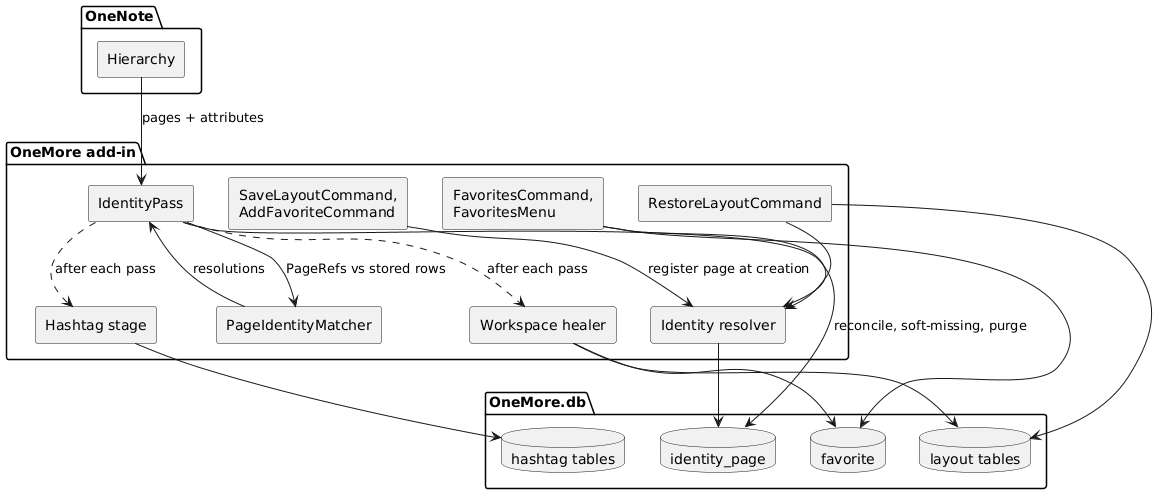
Architecture PlantUML (Refresh)
Components
|
Component |
Responsibility |
|
IdentityPass |
Stage 1 of the PipelineService. Runs a hierarchy-only pass over all open notebooks, independent of hashtag settings: one hierarchy call per notebook, no page loads. Builds the current page list, calls the matcher, writes results, purges long-missing pages, then fills in some of the missing page GUIDs within a time budget. It also publishes the snapshot (pages plus sections and groups) that the other stages and the resolver use. Interactive callers skip the GUID fill-in so they are never slowed by it. |
|
PageIdentityMatcher |
Pure function: stored records + current pages in, resolutions out. No database, no OneNote. Easy to test exhaustively. |
|
Identity catalog (identity_page) |
The page keys and their last-seen fingerprints. |
|
Target resolver |
Pure function over an IdentitySnapshot (the pages, sections and notebooks as of the last pass, including whether GUIDs are still being read). Resolves a stored reference, trying in order: page key, current handle ID, the GUID inside the stored uri, the fingerprint (title, created, notebook, section), then, if GUIDs are unread, pending, and last a location path (a guess, never saved). Outcomes: resolved, pending, offline (notebook closed), ambiguous, broken. Containers use keys, then handle, then location. Used by favorites, layouts, and the healer. |
|
Hashtag stage |
The existing scan, now consuming identity instead of keeping its own. |
|
Workspace healer |
After each pass, repairs favorites and layout windows and persists the repair. |
Why a separate, always-on identity pass
Favorites and layouts can point at pages in any notebook, including ones the user excluded from hashtag scanning, or when hashtag scanning is disabled. If identity were produced only by the hashtag scan, those references would have nothing to resolve against. The pass is cheap because it loads no page content.
Pipeline order for each cycle: identity pass, then hashtag stage, then workspace healing.
Decision: one pipeline in one background loop, hosted by PipelineService. The existing hashtag service is only half generic, so it is separated first: the generic host (thread, cancellation, error policy, run mode, per-stage timing) becomes PipelineService, and the hashtag-specific machinery (its settings, the scheduler that gates readiness, the provider, the results event, and rebuild preparation) moves into a HashtagStage. Each stage has its own interval and the host ticks at the shortest, so hashtag scanning can be slowed without slowing identity. Turning hashtags off stops only that stage, and turning them back on resumes it without a restart. The hashtag-specific progress event stays on HashtagStage; the host reports nothing itself. The three stages run in that order every cycle, so a hashtag scan can never run against identity that has not caught up. The hashtag service's disabled setting skips only the hashtag stage; the identity pass and healing keep running, because favorites and layouts depend on them. The tray's scheduled scan and rebuild call the same pipeline, so they too begin with an identity pass. The pipeline's tuning values, such as the missing-page grace period, are named constants.
4. Data model
|
Data Model PlantUML (Extract) |
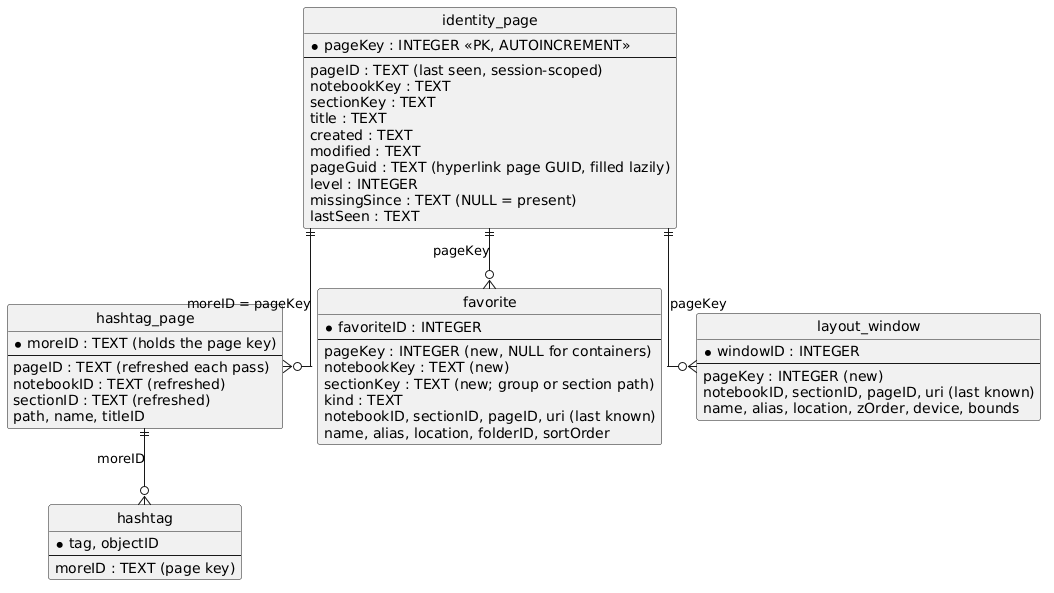
Data Model PlantUML (Refresh)
Notes:
- The OneNote IDs that remain in favorite and layout_window are last-known values, kept current by the healer. They are a cache, not the identity.
- layout_window.pageID stays NOT NULL, so a newly captured window always stores the ID it had when saved.
- Notebook, section-group, and section favorites carry no pageKey. They store notebookKey and sectionKey and are re-resolved by name and path.
- The hashtag tables keep the moreID column name and simply hold the page key as text. Renaming it would require a table rebuild for no behavioral gain.
- identity_page.pageGuid is part of the version 1 schema. It is nullable, indexed, and filled lazily; NULL means "not read yet", which is different from "has no GUID".
- The hashtag tables also keep their old pageID, sectionID, notebookID, path, and name columns, now refreshed from the hierarchy; they are a cache for the dialogs, not identity.
- There is deliberately no contentHash column. The later text index will add one (with the matching step) as an identity 1 to 2 upgrade.
5. Behavior
5.1 Background identity pass
|
Background identity pass PlantUML (Extract) |
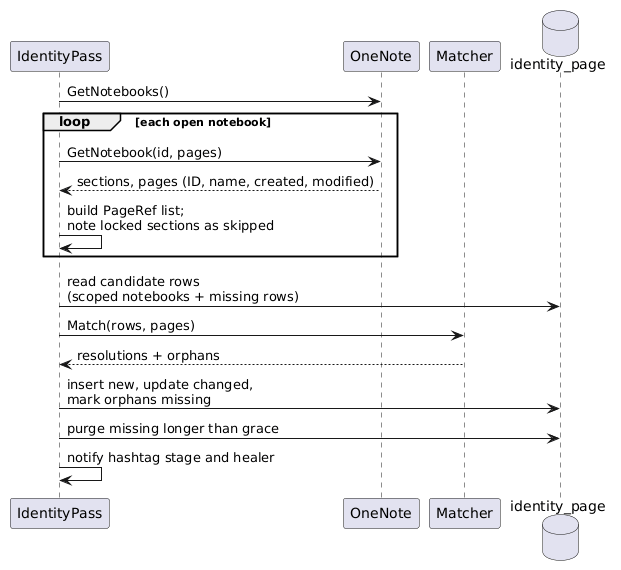
Background identity pass PlantUML (Refresh)
A notebook whose hierarchy could not be read is left out of the scope of the pass, so a failed read is never mistaken for an empty notebook.
5.2 A notebook is reopened
|
Notebook is reopened PlantUML (Extract) |
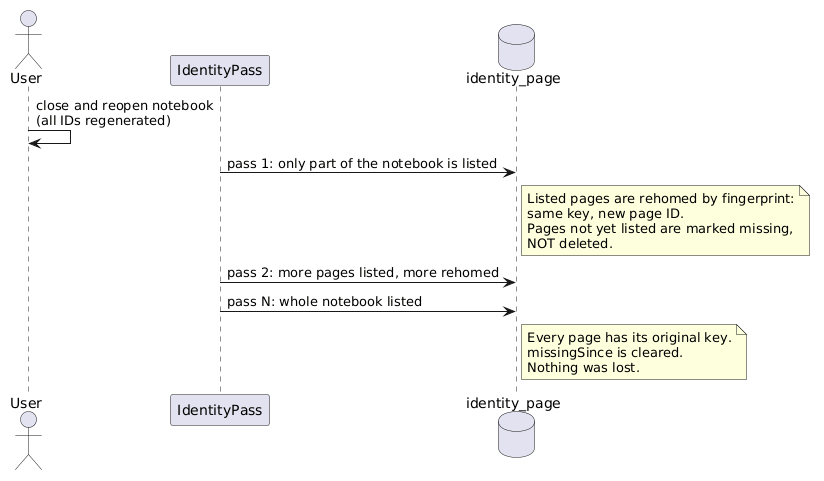
Notebook is reopened PlantUML (Refresh)
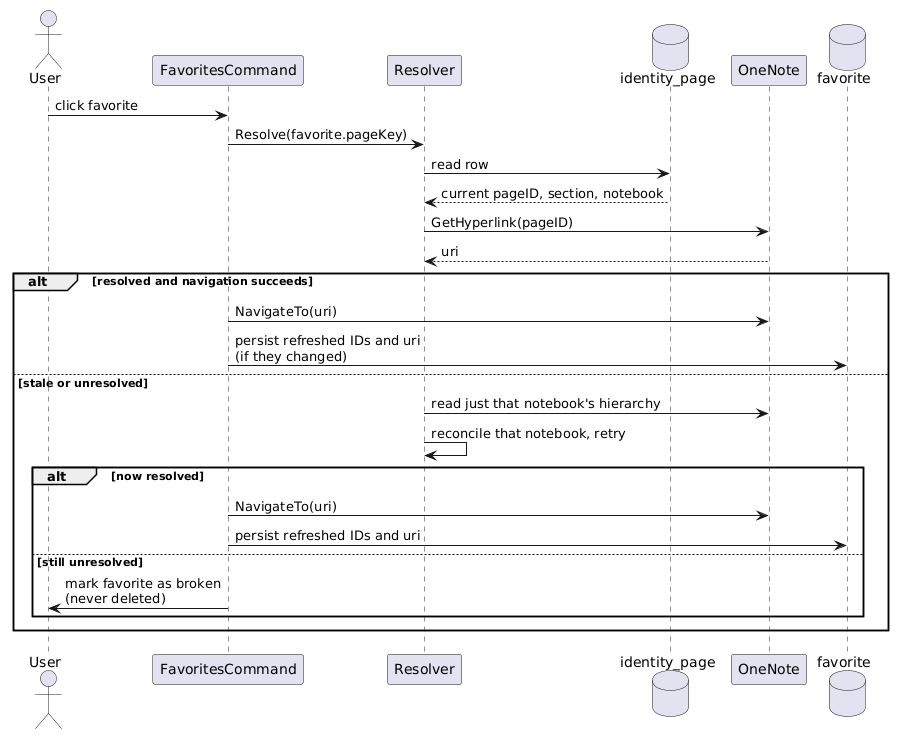
5.3 Navigating a favorite
|
Navigating a Favorite PlantUML (Extract) |
Navigating a Favorite PlantUML (Refresh)
As built, "Resolve" is the target resolver described in section 3: it tries the key, the current handle ID, the GUID inside the stored uri, and the fingerprint, and navigates with a link freshly generated for the resolved page. The landing is verified. OneNote reports success for a link that names a page that does not exist (and then shows something else or nothing), so after navigating the window's current page is compared with the page that was asked for, and the user is told when it differs. Healing and navigation never rename a favorite: name and alias are the user's, and only the IDs, location, keys, and uri are refreshed.
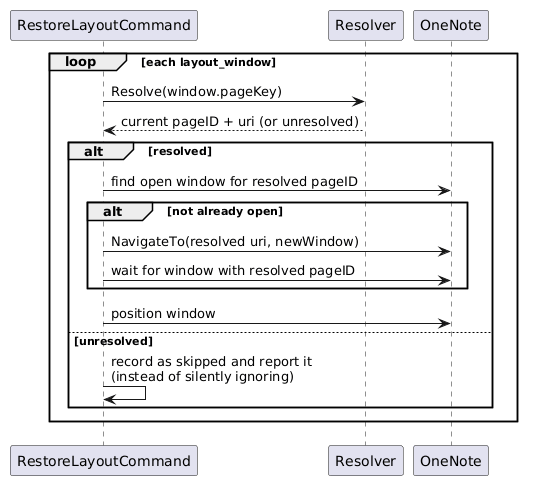
5.4 Restoring a layout
|
Restoring a Layout PlantUML (Extract) |
Restoring a Layout PlantUML (Refresh)
As built: the whole layout is planned first (each window resolved as in 5.3), then for each window the command looks for an open window that already shows the resolved page and reuses it, otherwise opens the resolved link in a new window and waits for it. Observed behavior that shaped it (technote, "Using a link to navigate"):
- A new-window request made right after another one was refused and still created a stray window. The command now waits 1.5 s after each window it opens, and retries a refused open up to three times.
- A window left open across a notebook reopen keeps a dead page ID, so it is never recognized as showing a layout window's page and is not reused: a restore after a reopen leaves such windows (blank) and opens new ones. The command never closes a window it did not open.
- A window that cannot be opened is named in a message with its reason (pending, offline, ambiguous, broken) and is never silently skipped. A window found by location alone is still opened, because restoring is an explicit request, but that guess is never saved.
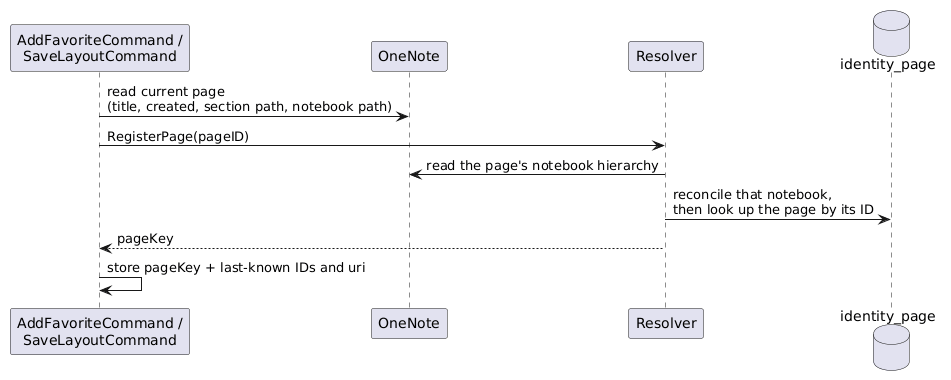
5.5 Adding a favorite or saving a layout
The page's fingerprint is captured at creation time, so the reference is born with a key.
|
Adding a Favorite PlantUML (Extract) |
Adding a Favorite PlantUML (Refresh)
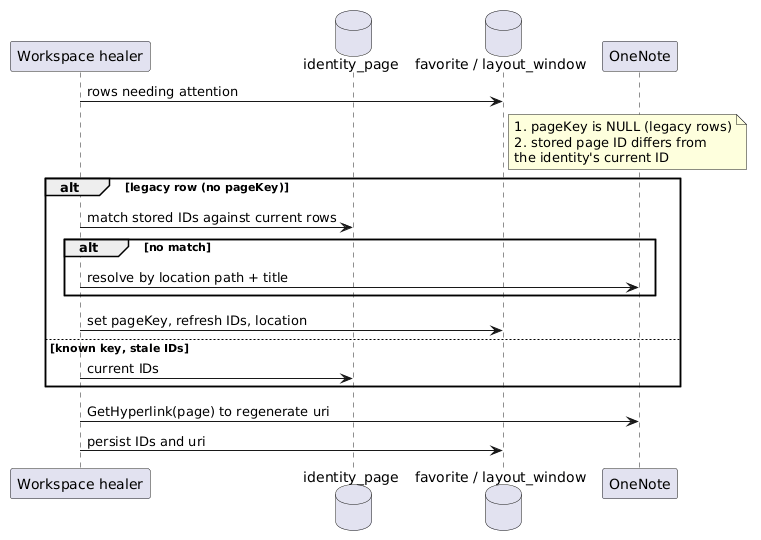
5.6 Background healing
|
Background healing PlantUML (Extract) |
Background healing PlantUML (Refresh)
6. Applying it to each feature
6.1 Hashtags
- Tags are keyed by the page key, stored as text in the existing moreID columns. ReadPageTags and WriteTags use the key; hashtag_page is joined by key, not by pageID.
- The scanner stops matching by ID and stops writing omPageID into pages (the stamp set by HashtagPageScanner.SetMoreID and written by HashtagScanner.ScanPage, and the stamp in DuplicatePageCommand). It keeps its one legitimate page write, which applies the hashtag style the user chose.
- Notebook rows are adopted by name after a reopen: a stored notebook whose ID is gone is taken to be the open notebook of the same name, keeping its inclusion setting and last scan. If either duplicate was excluded, the notebook stays excluded. This also removes the 100-page "new notebook" threshold problem for reopened notebooks.
- Which pages are read: changed pages, new pages, weak matches, and pages that have tags and whose ID changed (the object IDs stored with their tags are regenerated with the page ID, which was measured, so the tag must be read again to navigate to it). Reopening a notebook therefore re-reads only its tagged pages, not the whole notebook.
- Stored page info (pageID, sectionID, notebookID, path, name) is refreshed from the hierarchy for every tagged page on every pass, because the dialogs compare these with the IDs of the notebooks open now.
- Deleting tags is tied to purging missing pages after the grace period, replacing per-section phantom deletion.
- One-time migration: tags recorded under the old stamp keys are cleared and the scan time reset, so one background scan rebuilds them. Tags are derived from page text, so nothing is lost; notebook selections are kept.
- Search-time refresh. A search can happen between a reopen and the next pass. HashtagFreshener re-reads the IDs of result pages whose stored ID is stale at the moment of the search, so a result still navigates.
- HashtagCommand finds the current page's key by asking the resolver for its page ID, instead of reading a stamp from the page.
6.2 Favorites
- Page favorites gain pageKey. Navigation resolves the key to current IDs and a freshly generated URI (section 5.3).
- Section, section-group, and notebook favorites gain notebookKey and sectionKey and are re-resolved by name and path, using the same keys the identity layer already builds. They need no surrogate and no scan, only a resolve step. A notebook favorite today stores the notebook ID in sectionID and uri; the key columns replace that dependence.
- Unique indexes. The existing ID-based unique indexes (idx_favorite_target_page on pageID, idx_favorite_target_section on sectionID) are kept, and key-based unique indexes are added beside them (on pageKey, and on kind plus notebookKey plus sectionKey for containers). The old ones still reject a second favorite for the same current page ID and cover legacy and imported rows that have no key yet; the new ones cover resolved rows. Keeping them also means an older build that opens an upgraded database still works.
- Legacy rows (created before keys existed) are backfilled lazily by the healer, using TargetChecker's existing logic: match the stored IDs against the current hierarchy, else walk location by name. Healed values are then persisted, which today they are not.
- The existing root-folder convention (folderID = 0, not NULL) is left alone.
- The manual Check remains as a fallback and now saves what it repairs.
- Names are the user's. Healing, navigation, and Check update IDs, keys, location, and uri, never name or alias. A favorite renamed by the user, or whose page was renamed in OneNote, keeps its name.
6.3 Layouts
- layout_window gains pageKey.
- RestoreLayoutCommand compares open windows against the resolved page ID, and navigates by the resolved URI.
- A window that cannot be resolved is reported, not silently skipped. The healer also keeps layout_window keyed and current in the background, and a layout is restored from the resolved IDs even when nothing has healed it yet (section 5.4 lists what was observed about windows).
- LayoutsProvider has no version table today. It gains layouts_schema, following exactly what favorites did when it introduced favorites_schema.
6.4 Export and import compatibility
Favorites and layouts can be exported to JSON and imported again, possibly after the database has been upgraded, or on another machine. The existing code is already tolerant, which is what this design relies on:
- Export serializes the model objects with Newtonsoft (ExportFavoritesCommand, ExportLayoutsCommand). Import deserializes with default settings, so properties missing from the file take their defaults and unknown properties are ignored. It then writes each row through WriteFavorite / WriteWindow, which use an explicit column list rather than the old schema's shape. Importing resets every database-local ID first (favorite.ID = 0, FolderID and LayoutID reassigned).
What the design must therefore guarantee:
- An old file imports into an upgraded database. Old files have no pageKey, notebookKey, or sectionKey, so those arrive unset. The new WriteFavorite / WriteWindow must accept that and store NULL. The model property for pageKey must be nullable: a plain integer would deserialize as 0 and be stored as a real key.
- pageKey is database-local, like favorite.ID, and is never trusted from a file. A key is only meaningful in the database that issued it. Key 17 on another machine, or in a database that was since reset, is a different page. Export therefore omits it, and import discards any value it finds, exactly as it already discards ID. Imported rows are resolved afterwards by the healer.
- Imported rows are resolved on import where possible, and otherwise treated as legacy rows. The healer backfills the rest the same way as rows that predate the upgrade: stored IDs first (valid only if they happen to match this machine's current IDs), then location path plus title. A file from another machine will mostly resolve by the location fallback, with today's limits: no created time, so duplicate titles can be ambiguous, and unresolved rows are shown as broken.
- Duplicate detection does not depend on pageKey alone. The ID-based unique indexes are kept and key-based ones are added beside them (section 6.2), so an imported row that has no key yet is still rejected as a duplicate by the pageID index, exactly as today, and resolved rows are covered by the key index. No separate import-time duplicate check is needed.
- The healer must handle two rows resolving to the same page. After backfill, two legacy rows can map to one key, which the new unique index forbids. The healer keeps the first and reports the other as a duplicate instead of failing. The same applies when refreshing a stored ID would collide with another row that already holds that ID.
- A newer file imports into an older build. Because unknown properties are ignored, the added fields are simply dropped. This holds only while no import code turns on strict member handling, so it is called out as a constraint.
- Enrichment (built as a fingerprint). Export adds a fingerprint (title, created, notebookKey, sectionKey) to each favorite and layout window; it exists only in files and is omitted when empty. (A formatVersion field was also planned and was not built; old builds ignore the fingerprint and new ones treat a file without it as a legacy file.) On import each item is first looked up in the open notebooks using its fingerprint, since its keys are discarded; if found for certain it is stored keyed with this machine's IDs, and an item whose page is not found is stored without keys so that it cannot collide with another row's key. An import on another machine can then resolve against the local hierarchy by title and creation time instead of falling back to location and title alone. It is additive and compatible with every point above: old builds ignore the new fields, and the formatVersion lets later changes detect which shape they are reading. pageKey is still never exported.
7. Migration and versioning (summary)
Each catalog keeps its own version table and upgrade chain. The implementation plan will give the details; this is the shape.
|
Catalog |
Version table |
Now |
Target |
Schema change |
Data step |
|
Page identity |
|
none |
1 |
new tables identity_page (including the nullable, indexed pageGuid) and indexes |
none; GUIDs are filled lazily by the identity pass |
|
Hashtags |
|
5 (in main) |
6 |
none (the moreID column now holds the page key) |
clear tags, reset scan time (rebuild once) |
|
Favorites |
|
2 |
3 |
add pageKey, notebookKey, sectionKey; add two key-based unique indexes (the ID-based ones are kept) |
lazy, by the healer |
|
Layouts |
none (implicit 1) |
1 |
2 |
create layouts_schema; add pageKey; add a key-based unique index (the ID-based one is kept) |
lazy, by the healer |
Principles:
- Schema changes are pure SQL inside UpgradeCatalog, one transaction per step, ending with the version update, so a failed step leaves the old version in place. Providers are constructed in many contexts (dialogs, the tray, the calendar app) and must never need OneNote to open.
- Data that needs OneNote is deferred. Resolving legacy favorites and layout windows needs the hierarchy, so it is done by the healer when OneNote is available, not during the upgrade. Until then, rows behave exactly as they do today.
- Fresh databases get the final shape from the embedded DDL at the current version; existing databases get the upgrade chain. Both paths must produce the same schema and are tested against each other.
- A database newer than the code is left alone. If a catalog reports a version the code does not know, the provider logs it and runs no step, rather than guessing. (A developer database can hold a newer version from another build.)
- Shared helpers. ColumnExists and an upsert-style UpgradeSchemaVersion are currently private to individual providers and are lifted into DatabaseProvider. The upsert form is required because a version row may not exist yet (as with layouts_schema).
- DDL stays single-line per statement with the CREATE ... IF NOT EXISTS name form, because RefreshDataSchema and DropCatalog parse it that way.
- The identity catalog ships as version 1. During development it went to 2 when pageGuid was added; nothing had shipped, so the step was collapsed and the column is part of the version 1 schema. A development database an interim build left at 2 has the same shape, is left alone by the version 1 code (principle 4), and is corrected in place with UPDATE identity_schema SET version = 1;. The identity tables must never be dropped to do this: keys would restart at 1 and attach existing tags and favorites to the wrong pages.
- Older builds keep working. New columns are nullable and appended at the end, and the existing ID-based unique indexes stay, so a build from before this change can still read and write an upgraded database. This matters because several branches are built against the one real OneMore.db during development.
8. Failure modes and open questions
Known limits
|
Case |
Outcome |
|
Page renamed, moved, and creation date edited all at once, then reopened |
No hierarchy signal remains. It becomes a new page with a new key; its old key is purged after the grace period. Hashtags are rebuilt from content; a favorite shows as broken. |
|
Several pages identical on every signal |
Paired only if their location and modified time match (content is the same); otherwise treated as new. |
|
Reopened notebook not fully loaded at the next pass |
Pages already listed are rehomed; the rest are marked missing and kept. |
|
Stored page ID between a reopen and the next pass |
Stale. Consumers resolve through the identity row and fall back to a targeted single-notebook reconcile (section 5.3). |
|
Locked or encrypted section |
Its pages are skipped, not deleted. They cannot be hashed or read while locked. |
|
Closed notebook |
Its records are left untouched, and re-match by fingerprint when it is reopened. |
|
Windows left open across a notebook reopen |
They keep dead page IDs and show blank, so a layout restore cannot reuse them and opens new windows beside them. They are never closed automatically. |
|
Pages that share a page GUID |
Probably copies (10 of 1,986 measured). A GUID match is declined when more than one page or record carries it. |
|
Hashtag dialog scopes and the search command |
The dialog's notebook and section scopes filter by stored IDs, which can be stale for up to one pass after a reopen, and SearchHashtagsCommand does not refresh stale results as the dialog does. |
Decisions
|
# |
Question |
Decision |
|
1 |
Service topology |
One pipeline, one loop: identity, then hashtags, then healing. PipelineService is a generic host that runs stages; hashtag-specific machinery lives in HashtagStage. Each stage owns its interval. The hashtag disabled setting skips only its own stage and takes effect without a restart. The tray composes a one-shot pipeline instead of subclassing the service. |
|
2 |
Grace period for a missing page |
6 hours, as a named constant. Longer than any measured reload, short enough that deleted pages leave hashtag results the same day. Not a user setting. |
|
3 |
Export format |
Enriched with a fingerprint (title, created, notebookKey, sectionKey) per item, file-only and omitted when empty. pageKey is never exported. The planned formatVersion field was not built. |
|
4 |
Content-hash matching and omPageID stamps |
Left out until the text index. No contentHash column and no page-loading step in identity v1. Old omPageID stamps are not read. |
|
5 |
Cadence and cost |
No cheap-skip optimization. Run the full hierarchy-only pass over every open notebook each cycle, at the service's existing 2-minute interval. Measured cost is tens of milliseconds per notebook (see Measurements). Log each pass's duration so a slow case shows up. |
|
6 |
Hierarchy source |
One GetNotebook(id, Pages) call per notebook. The notebook-wide pages scope carries the same page-level metadata as the per-section call, so the scanner's per-section calls are not needed to skip tag-index pages. |
|
7 |
Page GUID in identity |
Yes, stored in identity_page.pageGuid and used as a ladder step. Measured to be the most persistent identifier (survives reopen, restart, move) and to map a stored link to a page exactly, at about 14 ms per page, so it is read lazily within a time budget per pass. A GUID shared by several pages is ambiguous. |
|
8 |
Favorite and window names |
Never written by healing, navigation, or Check. Names and aliases belong to the user; only IDs, keys, location, and uri are refreshed. |
|
9 |
Where the stored handle columns go |
Kept (hashtag_page page, section, notebook, path, name; favorite and layout_window IDs and uri) as a refreshed cache. They are not identity and are not removed by this work. |
Measurements
Taken 2026-10-03 against 9 open notebooks (8 cloud, 1 local; 1,984 live pages; 119 sections with pages), read-only, with the 2013 schema OneMore uses. OneNote was already running, so calls were warm.
|
Notebook (pages live / all) |
XML size |
One call for the notebook |
One call per live section, all sections |
|
447 / 523 (12 sections) |
132 KB |
20 ms |
35 ms |
|
436 / 437 (30 sections) |
106 KB |
20 ms |
34 ms |
|
376 / 377 (16 sections) |
89 KB |
16 ms |
26 ms |
|
157 / 157 (5 sections) |
38 KB |
7 ms |
11 ms |
|
the other four, 77 to 142 pages |
30 to 77 KB |
7 to 15 ms |
9 to 14 ms |
Times are the fastest of three runs for the notebook call. The slowest single section took 6 ms.
- Cost. The whole pass over all nine notebooks is on the order of 150 ms. Hierarchy calls are far cheaper than page loads (28 to 72 ms for one page), which is why the old 100-page threshold, a guard against page loads, does not apply to this pass. Calling per notebook or per section made no practical difference at this size.
- Page-level metadata. Of 1,984 pages, 275 carry Meta elements, and the notebook-wide pages scope returned exactly the same Meta elements as the per-section call for every page (0 differences). So the scanner can identify its tag-index pages from the notebook-wide result. Limit: none of these notebooks contains an omTagIndex page, so that specific marker was not observed; it is the same kind of page-level Meta element as the 275 compared.
- lastModifiedTime as a skip signal. In every one of the 119 sections with pages, and for all 9 notebooks, the section's and notebook's lastModifiedTime was at or after its newest page. That relationship holds, but only a static snapshot was taken. It was not tested whether a page move or a creation-date edit updates the section's or notebook's time, and the technote shows a date edit does not update the page's own. Because the pass is cheap, the design does not take that risk (decision 5).
Limits: the largest notebook had 523 pages including the recycle bin. Larger notebooks, a cold start, and a very slow cloud sync were not measured. Extrapolating linearly (not measured) puts a 10,000-page notebook at roughly half a second per call, which is why the pass duration is logged.
Also seen while measuring: 245 of the 1,984 pages still carry an old omPageID stamp from the previous hashtag scanner. The new design neither reads nor removes them.
Hyperlink GUIDs and object IDs. Measured 2026-10-04: 1,986 live pages gave 1,976 distinct page GUIDs; the whole read took 27.8 s (about 14 ms a page); a moved page kept its GUID; the title and paragraph object IDs of a page are regenerated on reopen. Details, and what was not determined, are in the technote.
Open questions
- Paragraph identity. Title and paragraph object IDs are regenerated on a reopen (measured), so anything that links to a specific paragraph must read the page again after one. Whether they survive a move is unmeasured. This matters most for the later text index, whose results navigate to a paragraph by its object ID.
- Reusing windows across a reopen. A window left open across a reopen cannot be matched to its page (dead ID). Reusing it would need a reliable way to navigate within a window that has a dead ID, which the API does not give; not attempted.
- An old section GUID. Whether a link carrying a moved page's old section GUID still opens it was not determined; links are regenerated from the resolved page so this does not matter today.
Not measured
Paragraph object IDs across a move, a second machine, renames of notebooks, sections, or pages, moving or renaming section groups, locked sections, the OneNote UI as the route for moves and date edits (the experiments used the API), other platforms, and very large notebooks. See the technote.
9. Testing strategy
|
Layer |
Approach |
|
Matcher |
Pure unit tests for every ladder step and every rule: reopen, gradual reopen, section move, notebook move, edited date, identical duplicates, a copy beside its original, strong signal preferred over weak, ambiguity declined. |
|
Identity provider |
In-memory SQLite (the internal constructor taking a SQLiteConnection, as in FavoritesProvider): persistence, rehoming, soft-missing and purge, key never reused, skipped sections, notebooks out of scope left alone. |
|
Upgrades |
For each catalog, build a database at the old version from the old DDL, open the new provider, and assert the schema, data, version, and that it matches a fresh database. Include a database newer than the code. |
|
Consumers |
Provider-level tests for the hashtag methods, favorites and layouts resolution, healing that persists, and unresolved references reported. The decision of which pages to read is a small, directly tested function. |
|
Import and export |
Keep fixture JSON files in the old format (captured from the current export commands before they change). Test that each imports into a database upgraded from the old version: rows are stored with NULL keys, a stray pageKey in a file is discarded, duplicates are still rejected, and two rows resolving to one page are handled. Also test that a file with extra, unknown properties still imports. |
|
Manual (needs OneNote) |
Close and reopen each notebook type and confirm favorites, layouts, and hashtags still resolve; move a page between sections and notebooks; edit a creation date and reopen; a half-loaded notebook; a locked section. Scripts from the measurement work can capture before and after snapshots. |
The scan loop and the commands talk to OneNote directly and cannot be unit tested; the design keeps logic out of them so that what is left untested is thin.
#omwiki #omdeveloper #omdesign
© 2026 Steven M Cohn. All rights reserved.
Please consider a sponsorship or one-time donation to support ongoing development
Created with OneNote.